Chapter 89 — "Company": announcements, assets, interviews
The Company group connects the employee to the organisation beyond their own record: what the company is telling them, what company property they hold, and, for some, the candidates they are helping to hire. It is the shortest group and the one HR is least asked about, until a laptop goes missing or an interviewer forgets their feedback.
What this chapter covers
The concept
Three small responsibilities sit with every employee: reading what the company publishes, looking after what the company lends them, and, when asked, judging candidates fairly and in writing. Each works best when the employee can see their part: the notices meant for them, the items in their name, the interviews assigned to them.
How Operentra handles it
- Announcements shows the live announcements meant for the person (Chapter 78).
- My Assets shows the company assets the person holds and the ones they handed back (Chapter 33).
- My Interviews shows interview panel members their interviews and takes their feedback (Chapter 29).
- Company Documents shows the handbooks, policies and forms shared with the person and asks them to acknowledge the ones that require it (22.7 for the HR side of documents).
- Who: every employee; My Interviews has content only for panel members.
Walkthrough
Imani Castellanos's portal (NWL-0007).
89.1 Announcements
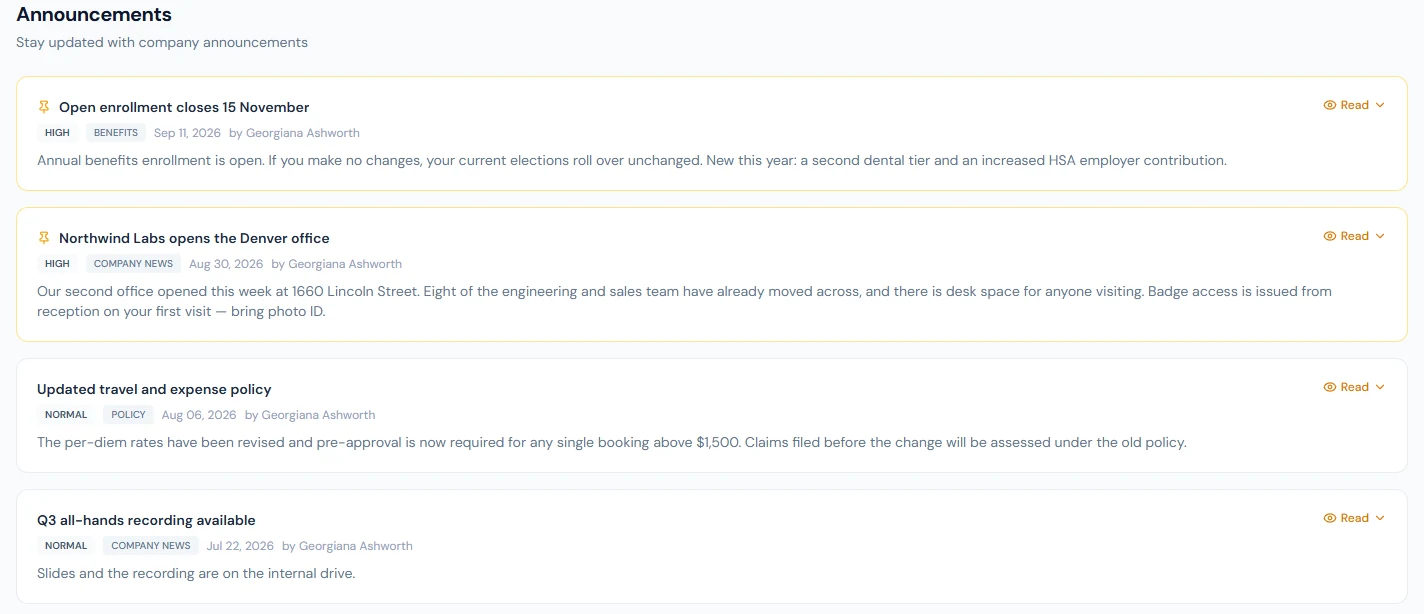
Announcements, "Stay updated with company announcements", lists what is live for the person, pinned first, then newest, each with its priority, category, date and author; Read opens the full text and any expiry date. The same announcements appear, five at a time, on the dashboard. Only the announcements meant for the person appear: by department, branch, role or name (Chapter 78).
89.2 My Assets
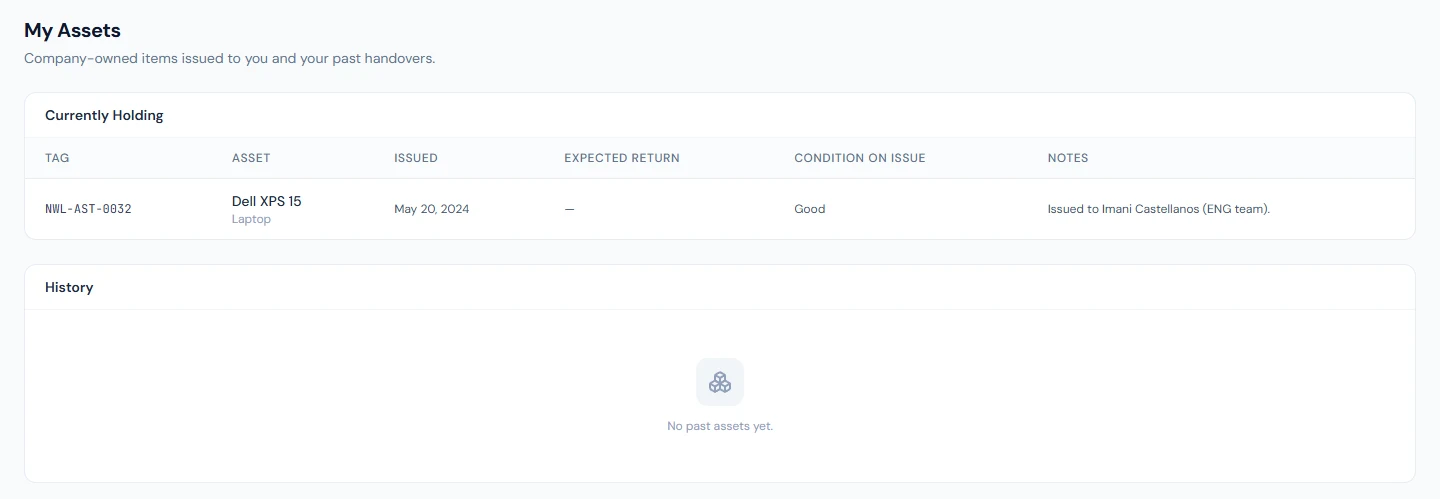
My Assets, "Company-owned items issued to you and your past handovers", has Currently Holding, with each asset's Tag, the Asset, when it was Issued, the Expected return date, the Condition on issue and notes, and History, the assets handed back with how long they were Held. When someone leaves, the offboarding checklist checks this list (Chapter 83): an asset still held keeps "Assets returned" open.
89.3 My Interviews (interviewers)
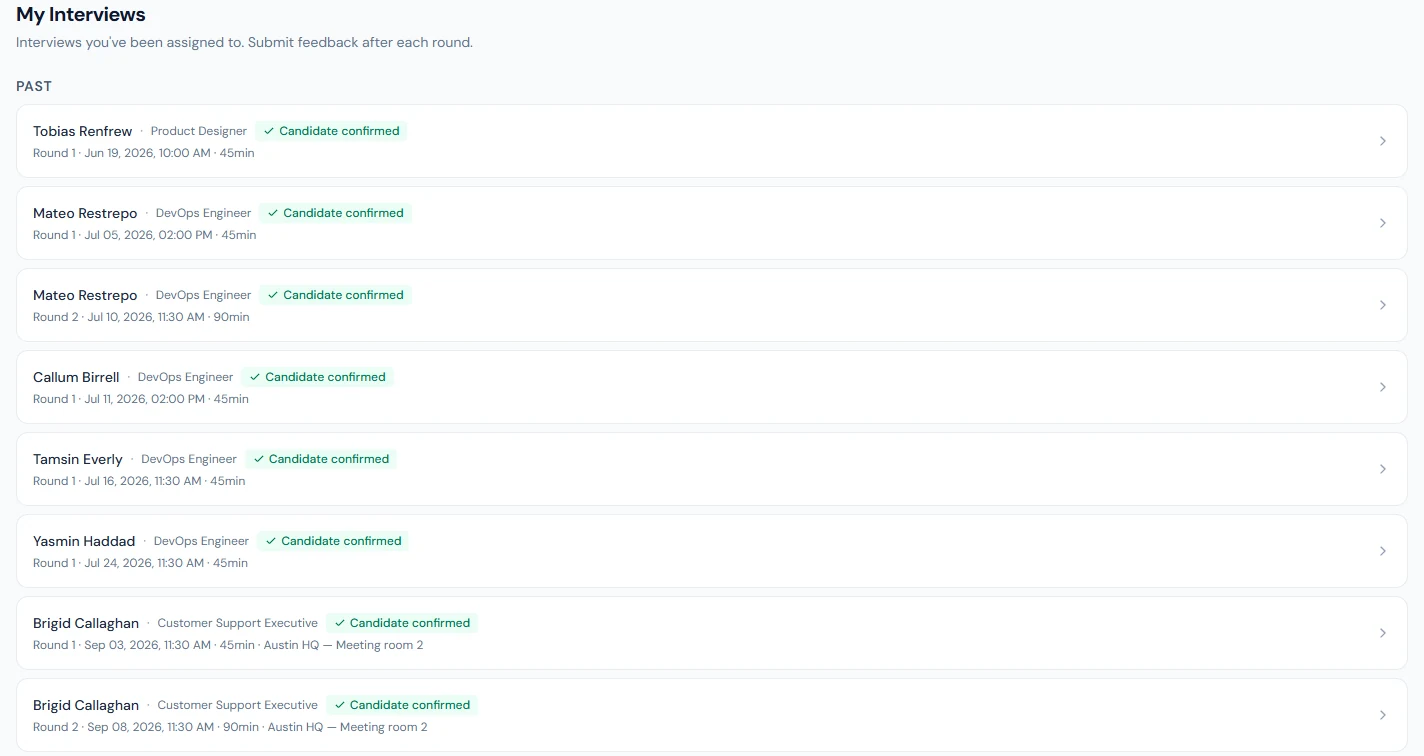
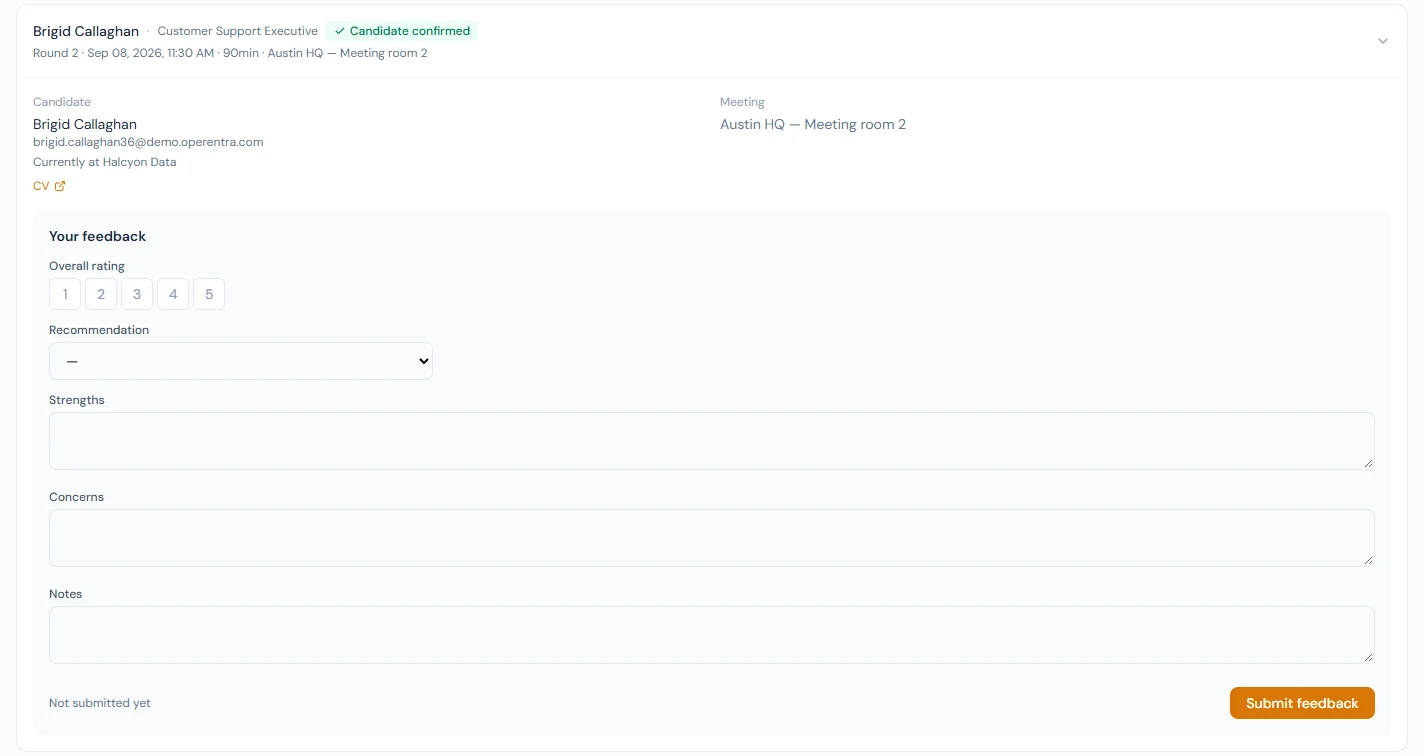
My Interviews, "Interviews you've been assigned to. Submit feedback after each round", shows panel members their Upcoming and Past interviews: the round, time and length, whether the candidate confirmed or asked to reschedule, the candidate with their current employer, LinkedIn and CV, the meeting link (Join meeting) and the organiser's notes. Your feedback takes an Overall rating, a Recommendation (Strong no, No, Yes, Strong yes), Strengths, Concerns and Notes; Submit feedback saves it to the candidate's record, and it can be updated later (Chapter 29). The dashboard's Upcoming Interviews shows the next ones.
89.4 Company Documents
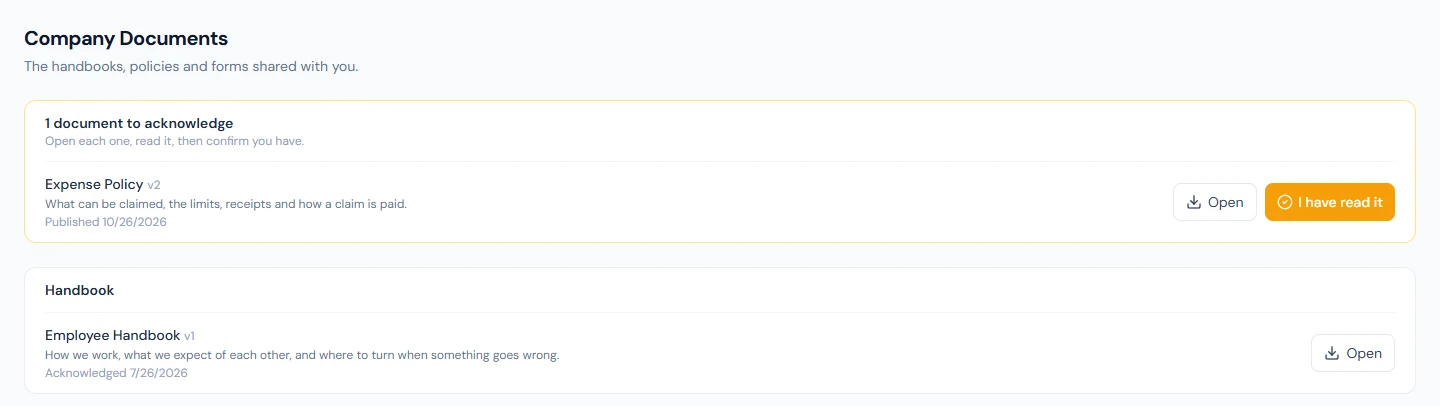
Company Documents, "The handbooks, policies and forms shared with you", lists what HR published from Company Documents › Document Library to everyone or to the person's department, grouped by category, each with Open. A document that asks for an acknowledgement sits at the top under documents to acknowledge until the person opens it and presses I have read it; the acknowledgement is recorded with the date and the version read, and a new version of the same document asks again. HR's side of the library shows who has acknowledged each document and who has not. Imani sees the Employee Handbook, already acknowledged, and the revised Expense Policy still waiting for her.
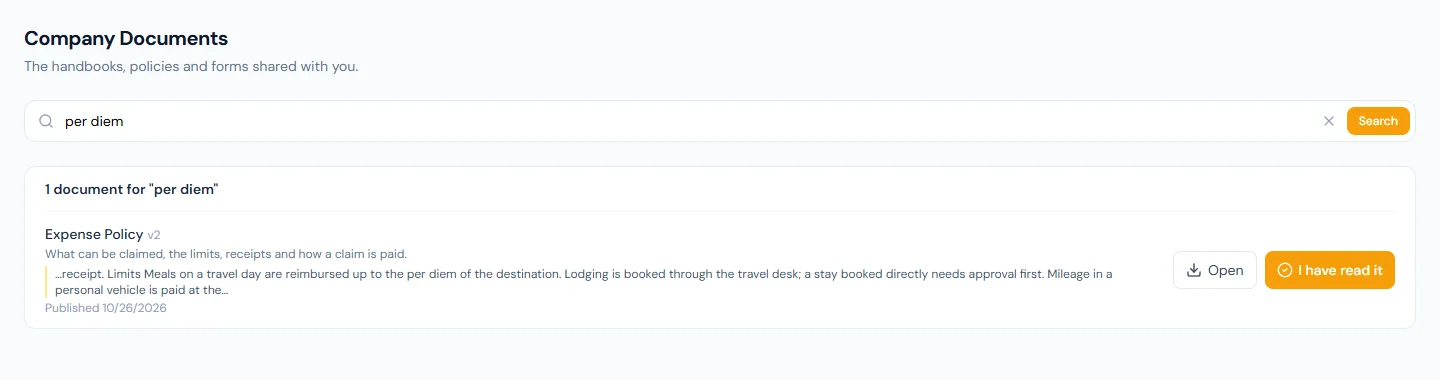
The search above the list looks through the titles, the descriptions and the text inside the files: PDF, Word (.docx) and plain text are read when HR uploads them. Imani types per diem and gets the Expense Policy, with the sentence from inside the PDF where the words are. The portal's search box (Chapter 84) and the assistant (Chapter 98) find documents the same way.
What cannot be read cannot be found. A scan is pictures of pages with no text in it, and HR's page for the document says so: "No text could be read from this file". Such a document is found by its title and description only.
What happens next
- Chapter 90 looks at managers, who use both the portal and parts of the admin panel.
What the employee sees
This chapter is what the employee sees.
Common mistakes
- Announcements to everyone that concern a few. Target the audience (Chapter 78).
- Issuing an asset without recording it. My Assets, and the exit checklist, only know what was recorded.
- Interview feedback days later, from memory. Write it after the round, while it is fresh.
- A recommendation without strengths and concerns. The hiring decision needs the reasons.
- Uploading a scan of the handbook. Nobody can find anything in it by searching, and the assistant cannot answer from it. Upload the original PDF or Word file; if a scan is all there is, put what it covers in the description.
Practice
Use your own trial workspace, not a customer's.
- Issue a test asset to a test employee and read My Assets as them; return it and read History.
- Add the employee to an interview panel, schedule a round, and submit feedback from My Interviews.
Quiz
1. Which announcements does an employee see?
The live ones meant for them, pinned first.
2. What does My Assets show?
The assets the person holds now and the ones they handed back.
3. How does My Assets relate to offboarding?
An asset still held keeps the "Assets returned" checklist item open.
4. What does interview feedback consist of?
An overall rating, a recommendation, strengths, concerns and notes.
5. Can feedback be changed after it is submitted?
Yes: Update feedback saves the new version.
6. The handbook is in the library, but searching for "probation" finds nothing. What is the likely cause, and where does HR see it?
The file is a scan: pictures of pages, with no text to read. The document's page in the Document Library says "No text could be read from this file". Uploading the original PDF or Word file makes the document findable by its contents; until then it is found by its title and description only.
6. A company document was revised. Does an earlier acknowledgement still count?
No. An acknowledgement is of a version; a new file on a published document makes a new version and asks everyone again.