Chapter 51 — Salary components
A payslip is a list of lines, and a component is the definition of one line: what it is called, which side of the slip it sits on, how its amount is worked out, and how tax treats it. Define them once, assemble them into structures (Chapter 52), and every run resolves them into amounts. This chapter is the component form field by field, with the engine's actual behaviour behind each one.
What this chapter covers
- 51.1 Component types and categories
- 51.2 Calculation: fixed, % of basic, % of gross, computed by payroll, computed by formula
- 51.3 Taxable and mandatory
- 51.4 Tax exemption modes
- 51.5 Statutory bases: where they really come from
- 51.6 The seeded components
The concept
A good component set is small and literal. Each line answers one question an employee or an auditor will ask of the slip: what is this, how was it calculated, was it taxed. Lines that exist to make a total come out right, or that carry rules nobody can state, are the ones that fail an audit. Two habits matter: name the line as the law or the contract names it, and give it the calculation the contract actually promises, not a formula that happens to produce the same number this month.
How Operentra handles it
- Payroll › Salary Components lists the workspace's components in three groups, Earnings, Deductions and Employer Contributions, with the code, the calculation, the default value and the taxable badge; Add Component and the row's edit open one form.
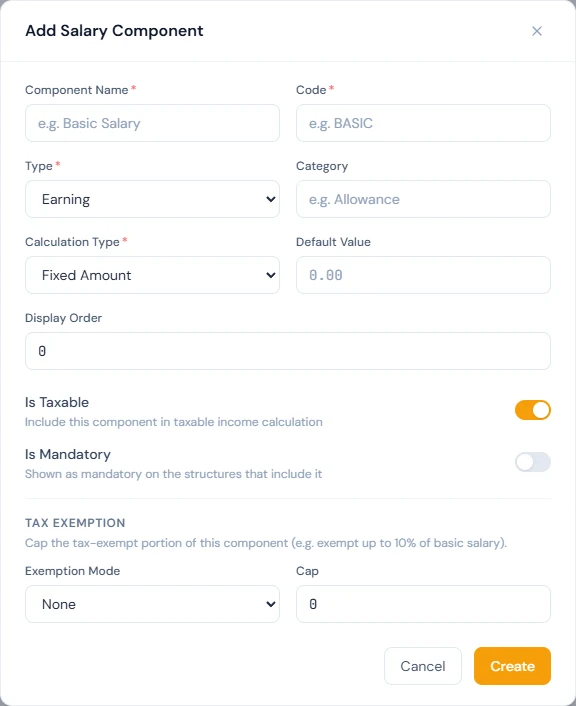
- The form: name, a unique code, type, a free-text category, calculation type, default value, display order, the Is Taxable and Is Mandatory switches, and a Tax Exemption section.
- Four calculation types: a fixed amount, a percentage of Basic, a percentage of the assigned gross, or computed by payroll, which is for the lines the engine works out from the country's rules (income tax and social-security contributions, recognised by their code).
- Delete deactivates rather than erases, so history keeps its label, and is refused while an active structure includes the component; an inactive component cannot be added to a structure.
- Who:
payroll.configure(Super Admin, HR Manager). The Accountant role processes and pays runs but does not define components.
Walkthrough
Northwind's list has six components: Basic Salary and Allowance as earnings; Income Tax, FICA and an inactive Other Deduction as deductions; FICA Employer as the employer contribution. Only three are on its structure (Chapter 52).
51.1 Component types and categories
Type decides the side of the slip. An Earning is paid to the
employee and adds to gross. A Deduction is taken from the
employee's pay. An Employer Contribution is the company's cost on
top of pay and never touches net; it appears on the slip's employer
side and in the run's totals. Category is a free label for
grouping and reports ("Salary", "Allowance", "Statutory", "Other");
it changes nothing in the calculation. Code is the short
identifier, unique in the workspace, that structures, imports and
the engine refer to; the engine recognises a few by name, BASIC
and TAX above all, so keep those codes exactly.
51.2 Calculation: fixed, % of basic, % of gross, computed by payroll, computed by formula
Fixed Amount pays the default value every month; a structure can
override the value per row, and the assignment can set it per
employee through the gross. % of Basic pays a percentage of the
Basic line, worked on the full contracted Basic so the slip's lines
stay consistent, with absence shown as its own deduction. % of
Gross pays a percentage of the assigned gross; Northwind's Basic is
100% of gross, which is how a single-figure salary becomes the
Basic line. Computed by payroll is for lines the engine works
out itself from the country's rules: income tax from the fiscal
year's slabs on the TAX code, and the country pack's social-security
contributions on their own codes (FICA for the United States). A
component of this type whose code the engine does not recognise pays
its default value, which is usually zero.
Computed by formula or tiers is for a rule the company writes
itself and payroll applies every month: an attendance allowance paid
when the month was fully present, a commission on the month's sales
reports, a performance bonus from merit points. The form takes a
formula, if(presentDays >= 22, round(basic * 0.1), 0) or
min(salesMetric("new_sales") * 0.02, 25000), that can read the
Basic and gross, the month's day counts, the merit points, the years
of service, a line above it in the structure with component("CODE")
and a sales-report metric with salesMetric("key"), with min,
max, round and if; or a tier table with no formula at all:
merit points up to 50 pay nothing, up to 80 pay 5% of basic, above
pay 10%. What a formula may use on the form lists every variable;
Preview prices the draft against any employee and month exactly as
the run would, and shows every figure it read, before anything is
saved. A formula the engine cannot read is refused on saving, with the
position, and so is one that reads a component the workspace does not
have. Seeing a person's priced lines, Preview needs the permission to
view salaries as well as the one to configure payroll. Northwind's
Attendance Allowance is such a line: 2,500 when
the month had no absence and no late arrival (Chapter 54).
Basic itself is resolved from the assignment: a Basic that is a percentage of gross takes that share of the employee's gross; a fixed Basic takes its value.
51.3 Taxable and mandatory
Is Taxable puts the line into taxable income, after any exemption in 51.4; Basic and a cash allowance are taxable in most countries, and a reimbursement is not. Is Mandatory marks the component as mandatory when it is added to a structure, where the Mandatory column shows it; it is a label for the people building structures, not a rule the engine enforces, so a structure can still be saved without a mandatory component.
51.4 Tax exemption modes
The Tax Exemption section caps the part of a taxable component that escapes tax. None taxes the whole line. % of Basic Salary exempts the line up to a percentage of Basic. Flat Amount Cap exempts it up to a fixed amount in the workspace currency. The exempt part is left out of taxable income and the rest is taxed; the line itself is paid in full either way. Use it only where the statute gives the allowance a tax-free share; where it does not, the honest setting is Taxable with no exemption.
51.5 Statutory bases: where they really come from
Every statutory amount has a base, and in Operentra the base is set by the rule, not by a flag on the component. A provident-fund line is a percentage of Basic, so Basic is its base. The country pack's social-security contributions use the base the pack states for each one: Basic, Basic plus housing, or the pay earned that month, which is why they fall when absence docks pay and do not when a lateness penalty does. Gratuity follows the country's end-of-service rule (Chapter 62). Overtime is recorded and approved in attendance (Chapter 39) and is not priced by the engine. An earlier form carried four "base" switches per component that nothing read; they are gone, and the bases are the rules above.
51.6 The seeded components
A new workspace starts with Basic Salary (fixed, taxable, mandatory,
category Salary), Allowance (fixed at 0, taxable with no exemption,
category Allowance, paying nothing until a structure gives it an
amount), Income Tax (a deduction computed by payroll on the TAX
code), and Other Deduction, inactive, which exists so that
salary-history imports (Chapter 64) can carry an old slip's unmapped
deduction. The country pack adds its own statutory lines: a US
workspace gets FICA as a deduction and FICA Employer as an employer
contribution, both computed by payroll, and other countries get
theirs. A pack that knows its country's allowances seeds them in
place of the plain Allowance: a UAE workspace gets Housing, Transport
and Other Allowance. A Medical Allowance with a tax-free share is one
country's statute, and only a workspace in that country gets it.
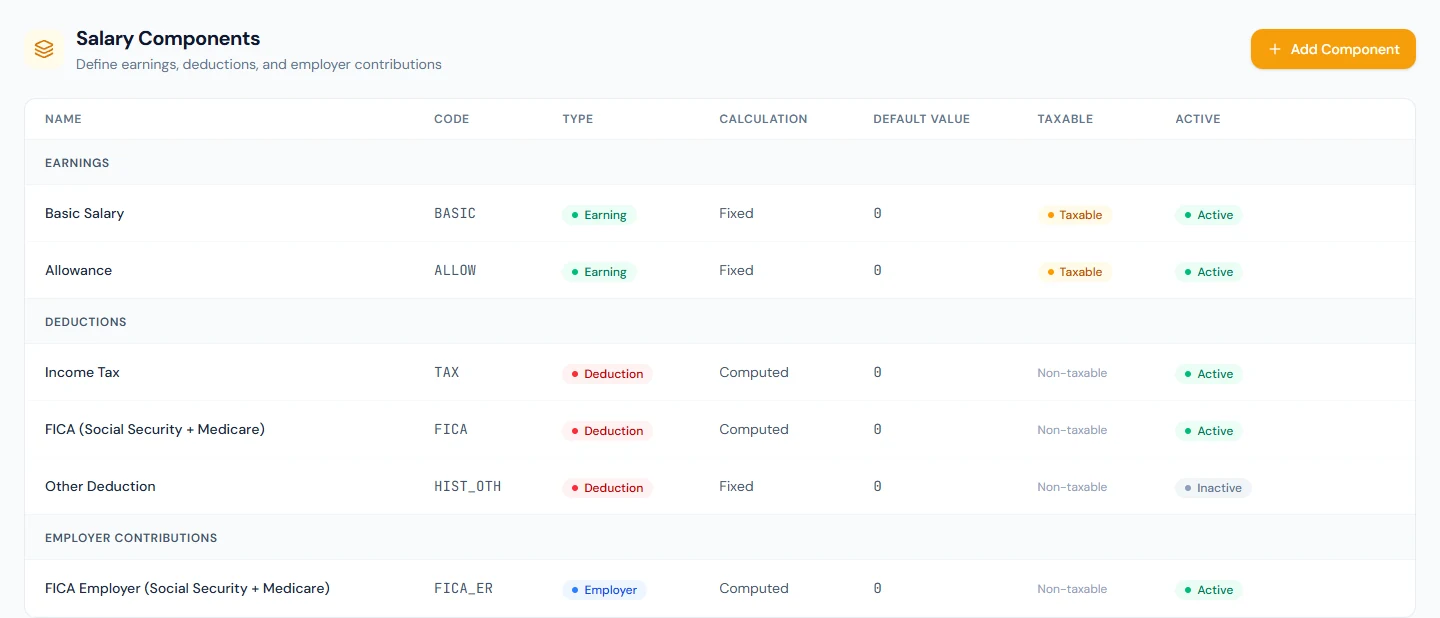
Northwind's Allowance is the plain one, taxable with no exemption; nothing on its payslips uses it, because the structure does not include it.
What happens next
- Structures (Chapter 52) pick components and set per-row calculation and values; assignments turn them into amounts.
- The run (Chapters 54 and 55) resolves every line, taxes the taxable ones after exemptions, and computes the statutory lines by code.
What the employee sees
The component names and amounts as lines on their payslip, grouped as earnings, deductions and the employer's contributions, with the taxable income the tax line was computed on.
Common mistakes
- A formula on a Computed by payroll line. That type is priced by code and the text is a note; a rule of the company's own belongs on Computed by formula or tiers, where it is evaluated.
- Renaming the
TAXorBASICcode. The engine finds them by code; a renamed one silently stops working. - An allowance marked non-taxable by habit. Where the statute taxes it, the slip under-withholds and the employee pays later.
- A percentage of gross on an allowance that should follow Basic. Gross includes the allowance itself; the arithmetic is circular in spirit even if the engine computes it.
- Expecting Delete to erase. It deactivates, so slips keep their lines, and it is refused while an active structure includes the component.
- Expecting Is Mandatory to force inclusion. It labels the row in a structure; the structure's builder still chooses.
- An employer contribution entered as a deduction. It would come out of the employee's pay.
- Using Other Deduction for live payroll. It is inactive on purpose, for imported history only.
Practice
Use your own trial workspace, not a customer's.
- Open Payroll › Salary Components and read the three groups; open Basic Salary's form and read every field.
- Add "Phone Allowance" as a fixed, taxable earning, category Allowance, with a default of 50, and read it in the list.
- Edit Allowance and set a flat-cap exemption of 100, then set it back to None.
- Try to delete Basic Salary and read the refusal; delete Phone Allowance and confirm it leaves the structure picker.
- Open Income Tax's form and read the note under Computed by payroll.
Quiz
1. What are the three component types and which never reaches net?
Earning, Deduction and Employer Contribution; the employer contribution is the company's cost and never reduces the employee's pay.
2. What does Computed by payroll mean, and how is it different from Computed by formula?
Computed by payroll is priced by code from the country's rules: income
tax on TAX, social-security contributions on the pack's codes; an
unrecognised code pays its default value. Computed by formula or tiers
is a rule the company writes, evaluated every month from the month's
figures, the merit points, the sales reports and the lines above it.
3. How does a tax exemption work?
The exempt part of the line, up to a share of Basic or a flat cap, is left out of taxable income; the line is still paid in full.
4. Where does the base of a statutory contribution come from?
From the rule: a provident-fund line is a percentage of Basic, the pack's social-security contributions use the base the pack states, gratuity follows the country's end-of-service rule.
5. When is deleting a component refused?
While an active structure includes it; otherwise Delete deactivates the component, which keeps history and removes it from the pickers.