Portal tour
The self-service portal is the employee-facing side of your workspace. Every
person with an employee record and a login lands here at /portal. It is where
you check your own attendance and leave, download pay documents, request
letters, and keep your profile up to date — without emailing HR for every small
thing.
Alongside the portal sits My Account (/profile) — a personal area that
belongs to you, not to any one company. Your personal profile, employment
history, password, sign-in email and the emails Operentra sends you live there
and travel with you across every workspace you belong to. See
Profile & security.
Employees never see the admin app. The portal only ever shows a person their own data.
The portal installs as an app on a phone or computer, with notifications on that device and clock-ins that are kept when the signal drops. See Install the app.
Finding your way around
The left sidebar is titled Employee Portal and is organised into collapsible sections — Me, Time, Money, Work, and Company — so related pages sit together:
| Section | Page | Route | What it's for |
|---|---|---|---|
| — | Dashboard | /portal | Your home screen — a snapshot of everything |
| Me | My Profile | /portal/profile | Your employer's approved copy of your details, plus documents and verifications |
| Me | Where I Work | /portal/work-location | Where you are working from today and on the days ahead, your usual week, and where your team is (see Where I work) |
| Me | Assistant | /portal/assistant | The AI assistant's full page: ask about your own records, and have it prepare requests for you to confirm |
| Me | Letters | /portal/letters | HR letters issued to you, and letter requests |
| Me | Contracts and agreements | /portal/contract | Your employment agreement, and the other agreements with the company, to read and accept |
| Me | My ID Card | /portal/brand-studio/id-card | Your company ID card and its status, and replacement requests |
| Me | My Email Signature | /portal/brand-studio/signature | Your company email signature, to paste into your mail app |
| Me | My Business Card | /portal/brand-studio/business-card | Your business card, and orders for a batch |
| Time | My Attendance | /portal/attendance | Your daily attendance record, and GPS clock in/out where your employer uses it |
| Time | Field Visits | /portal/field-visits | Check in and out at client meetings with GPS (enrolled field staff only) |
| Time | My Schedule | /portal/schedule | The shifts published for you, two weeks at a time, and swaps with a colleague (see My schedule) |
| Time | My Timesheet | /portal/timesheets | The week's hours by project and task, to submit for approval (see My timesheet) |
| Time | Team Timesheets | /portal/team-timesheets | Approve or return your direct reports' weeks (approvers only) |
| Time | My Leaves | /portal/leaves | Leave balances, policies, and past applications |
| Time | Apply Leave | /portal/leaves/apply | Submit a new leave request |
| Time | Holidays | /portal/holidays | Upcoming company holidays |
| Money | My Salary | /portal/salary | Salary slips, acknowledge receipt, download PDFs |
| Money | Tax Certificates | /portal/tax-certificates | Yearly income-tax certificates (income-tax countries only) |
| Money | My Loans | /portal/loans | Company loans and repayment schedule |
| Money | My Expenses | /portal/expenses | Reimbursement claims for money you spent for the company |
| Money | Team Expenses | /portal/team-expenses | Approve your direct reports' claims (managers only) |
| Work | Approvals | /portal/approvals | Shown to everyone. Inbox holds every request waiting on your decision; if you approve nothing it stays empty, and My requests still shows the progress of the requests you have made. A Delegations tab, for handing your approvals to a colleague while you are away, appears if your role allows it |
| Work | My Tasks | /portal/my-tasks | Tasks assigned to you, with deadlines and points; opens on the ones still open |
| Work | Checklist Tasks | /portal/checklist-tasks | Tasks on someone's onboarding, transfer, promotion or offboarding checklist that are assigned to you, to mark done (shown only while you have one; see Checklist tasks) |
| Work | Daily Report | /portal/daily-report | Your end-of-day work report, where your company uses them |
| Work | Sales Report | /portal/sales-report | Your weekly sales figures (staff in a sales department only) |
| Work | My Performance | /portal/my-performance | Your performance and merit history |
| Work | My Goals | /portal/goals | Your goals and check-ins, and how they line up with your team's and the company's (see Goals, 1:1s & feedback) |
| Work | 1:1s | /portal/one-on-ones | One-to-one conversations with your manager, and with each of your reports if you manage people |
| Work | My Appraisals | /portal/appraisals | Appraisal cycles — self reviews and results |
| Work | Feedback Requests | /portal/feedback | Requests for your view of a colleague for their appraisal, to answer or decline |
| Work | Reviews | /portal/reviews | The appraisals you review as a manager (reviewers only) |
| Company | Announcements | /portal/announcements | Company-wide notices |
| Company | My Surveys | /portal/surveys | Surveys you have been asked to answer (see Surveys) |
| Company | Company Documents | /portal/company-documents | Handbooks, policies and forms HR shares with you, and the ones to acknowledge |
| Company | Knowledge Base | /portal/knowledge | Articles your employer has written about how things work here (see Knowledge base) |
| Company | My Assets | /portal/assets | Company items issued to you |
| Company | My Interviews | /portal/interviews | Interviews you are on the panel for |
| — | My Documents | /portal/documents | Your uploaded documents and their status |
Some entries only appear when they apply to you — for example, Tax Certificates only exists in countries that levy income tax, a Sales Report entry shows up only for staff in a sales department, and Team Expenses, Team Timesheets and Reviews appear only if your role lets you decide for your direct reports. My ID Card, My Email Signature and My Business Card appear only if your company uses them (see ID card, email signature & business card). Assistant appears if your role allows it (see Assistant).
Others depend on what your company has switched on. My Schedule, My Timesheet, My Surveys, the pages for tasks, goals and appraisals under Work, and the pay pages under Money are missing from the sidebar when your workspace does not use that part of Operentra. Nothing of yours is lost: the entry is not shown.
Some pages, such as Reviews and Team Expenses, need a permission your role may not have. If you open one from a bookmark or a link without it, the page says You don't have access to this page and names the permission it needs. Ask your HR administrator if you should have it.
Your personal details — the profile you own, your employment history, and
your password and sign-in email — are not in the sidebar at all: they live in
My Account (/profile), opened from your avatar menu in the top bar.
The bell in the top bar holds your notifications — approvals, reminders, tasks and company news — with a count of the ones you have not read yet. See Notifications.
Searching the portal
The box at the top of every portal page searches several things at once: your colleagues, the knowledge base, the company documents shared with you, the news, and your own requests by title or number. Type two letters or more and the results open under the box, grouped, as you type.
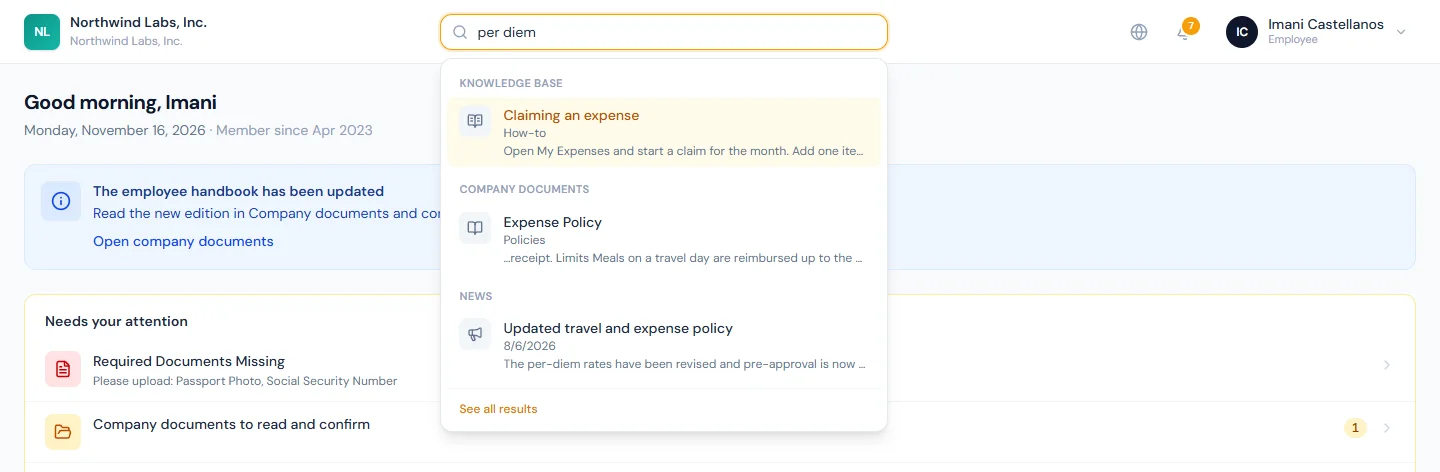
- Press / (or Ctrl+K, ⌘K on a Mac) to put the cursor in the box from anywhere on the page.
- Move through the results with the arrow keys and press Enter to open one. Enter with nothing chosen, or See all results, opens the full results page, where each group links on to its own page.
- Search looks for whole words or the start of a word, and for every word you
type:
leavfinds leave,travel deskfinds the document that holds both. - A company document is found by what is written inside the file too, so a rule on page twelve of the handbook is found without knowing which document it is in. A scanned document is found by its title and description only.
- You only ever find what you can already open: the articles and documents aimed at you, the news you can read, and colleagues with the details your employer chose to show. Where the people directory is switched off, no people are listed.
On a phone the box is a magnifier icon in the top bar, which opens the same search as a page.
Your language
The globe icon in the top bar switches the portal's interface language — Arabic flips the whole layout right-to-left. The choice is remembered in your browser (per device) and never changes anything for anyone else.
Your email language is a separate, account-level choice: set it on
My Profile (/portal/profile) with the Email language selector, and HR
emails and notifications will arrive in that language. After you switch the UI
language with the globe, a one-time banner also offers to match your email
language — accept it or dismiss it; the My Profile selector is always there
either way.